


Global News-Headlines & Alerts
4.356.00 Reviews
App Specs
- Version
- 1.2.3
- Updated On
- License
- Free
- Downloads
- 100,000+
- Developer
- EASE Group
- Categories
- News & Magazines
- Platform
- Android
Screenshots

 Analysis by AppCompare
At our kitchen table, news rarely stays on one screen for long. Someone checks a headline while breakfast is being made, another person wants to know what is happening locally, and I may be trying to follow a larger story without turning the morning into an endless scroll. That is the kind of shared routine where Global News-Headlines & Alerts makes sense: it is a news app from EASE Group, intended to bring world and city coverage into one place. I like the basic idea, though a shared phone also makes it worth thinking about whose interests shape the feed and which alerts everyone will hear.
A household feed needs a little personal space
On a device passed around the home, a customized feed can quickly become a mixture of different interests. One person may want politics, another sports, and someone else entertainment. That can be convenient when the aim is to browse together, but less useful when each person expects a feed that feels personal. I would treat the selected topics as a starting point for the main device user, rather than assume the app creates separate household profiles.
A practical routine is to decide who is responsible for changing the feed and to keep the shared selection broad enough that it remains useful to everyone. If one person is following a specific story, they can search or browse for it during their turn rather than repeatedly reshaping the household’s main mix. That small boundary helps avoid the familiar problem of opening a news app and finding that its front page has become someone else’s reading list.
Alerts are useful only when the household agrees
Breaking-news notifications can help when a major event matters to the people using the device, but frequent alerts may interrupt work, meals, or quiet time. I would start conservatively: enable only the alerts that genuinely help, then reassess after a few days. A notification should be a prompt to look, not a reason for everyone nearby to stop what they are doing.
On a shared device, it also helps to agree on who will respond to an alert and whether the story needs to be read immediately. For example, if a headline appears during dinner, one person can check it after the meal instead of letting every notification pull the group into a live-news cycle. This is a simple coordination habit, not a special feature, but it makes alerts more useful and less intrusive.
Age context and trust still matter
The app is rated for Everyone, which makes it broadly suitable from an age-rating standpoint, but that does not mean every news story is a good fit for every child at every moment. News can cover distressing events, and adults may want to read alongside younger family members, explain what a headline means, or choose another activity when the topic is upsetting. I would not treat an age label as a substitute for a parent’s judgment about what a child is ready to see.
I also avoid treating any single headline feed as the final word on a developing story. When something consequential appears, I compare the coverage with another reliable source before sharing it or acting on it. That is sensible practice with any news app, especially when alerts make an item feel urgent. The convenience is real, but speed and certainty are not the same thing.
Worth Reading Before You Choose

EA SPORTS FC Mobile 26 Is a Bigger Football Game, but It Takes Time

Flipboard Shows What News Apps Must Do Beyond the Feed

Switching to Android Auto Means Rethinking Your Driving Routine

Google Calendar Makes a Crowded Week Easier to Manage

Ludo King Makes the Most of the Minutes Between Plans

Baby Panda World Brings Quick Play to Modern Phones, but Its Game Library Feels Busy
Getting Started with Global News
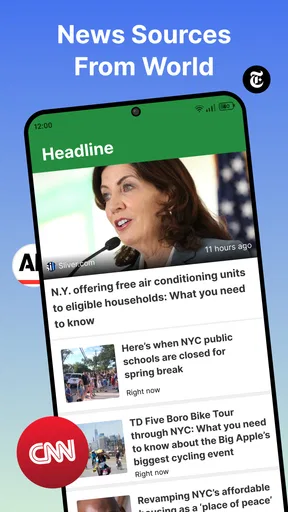
First things first, downloading and setting up Global News-Headlines & Alerts is a breeze. Available on both Android and iOS, you simply head over to your app store of choice, hit download, and voila! It’s as easy as pie. Once installed, the app greets you with a sleek and intuitive interface, making navigation feel as smooth as silk.
Customization at Your Fingertips
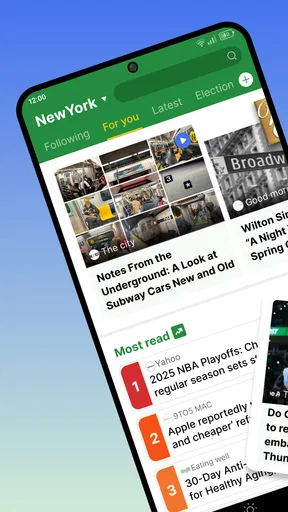
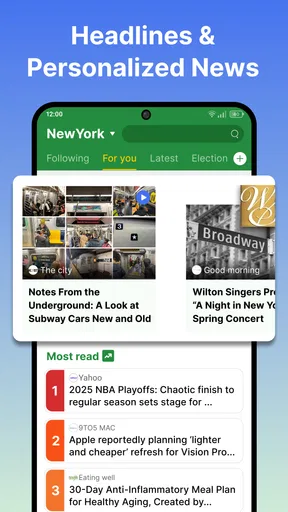
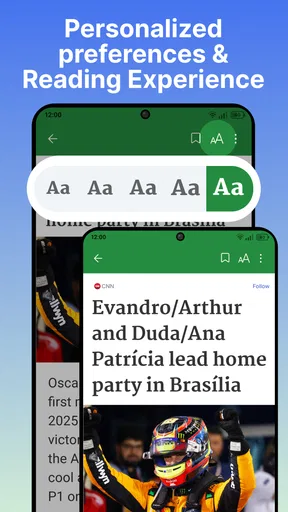
One of the standout features of this app is its customization options. You can tailor your news feed to your interests, choosing from categories like technology, politics, sports, and entertainment. This means you can dodge the stories that make your eyes glaze over and dive straight into the stuff you really care about. Fancy that!
The app also lets you set up alerts for breaking news. So, whether it’s a historic election or the latest celebrity shenanigans, you’ll be in the loop faster than you can say "headline." It’s like having your very own news butler.
Slick and User-Friendly Design
Let’s chat about the design for a moment. The app’s layout is clean and modern, making it easy for you to find what you’re looking for without any fuss. The developers really nailed it here. The fonts are easy on the eyes, and the images load quickly, ensuring a seamless browsing experience.
Another cool feature is the night mode, which is a lifesaver for those late-night news binges. Just a tap, and your screen adjusts to a darker theme, reducing eye strain. It’s like a warm blanket for your eyes.
Staying Informed, Anytime, Anywhere
With Global News-Headlines & Alerts, you’re not just limited to written articles. The app integrates multimedia content like videos and podcasts, offering a more immersive experience. Whether you’re on your morning commute or taking a break, you can catch up on the news in a way that suits you best.
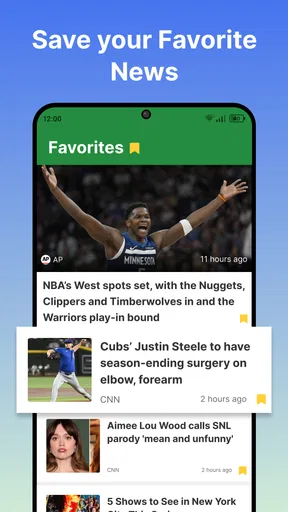
Offline mode is another handy feature. Simply download your favorite articles when you’re connected to Wi-Fi, and read them later when you’re off the grid. It’s perfect for those moments when you’re stuck with no signal but still crave your news fix.
Where it fits among other news options
I see this app as a convenient general-purpose reader rather than a replacement for every source I follow. Compared with opening individual newspaper or broadcaster apps, a combined feed can make a quick scan feel less fragmented: I can browse several subjects without jumping between separate home screens. Compared with a social feed, a news-focused app is a more deliberate place to catch up, rather than relying on whatever friends or algorithms happen to put in front of me.
There is a trade-off, though. A broad selection is good for discovery, but readers who need deep reporting from one particular publication may prefer that outlet’s own app. Likewise, anyone who wants a tightly curated briefing from a specific editor may be better served by a publication with that approach. I would use this app to spot what deserves attention, then open a trusted source for context when a story affects a decision or needs careful follow-up.
A more useful daily reading rhythm
For a realistic weekday routine, I would check the feed briefly over breakfast, save a small number of articles for later, and keep alerts limited to genuinely important breaking stories. On a commute, downloaded reading can be handy if I expect to lose connectivity; at home, videos or podcasts offer another way to catch up when reading is inconvenient. The point is to give news a place in the day without letting every headline dictate the day’s pace.
One useful habit is to separate “interesting” from “urgent.” A story can be worth reading without deserving an immediate notification or a place in the shared conversation. I would also revisit topic choices after my interests change, rather than letting an old selection quietly determine what I see. These small choices make customization work as a tool instead of turning it into another stream that needs constant attention.
What to expect from setup and everyday use
The app is free, and its current version is 1.2.3. It needs Android 8.0 or later, so I would check that before trying to install it on an older device. Its broad availability and simple premise make it easy to try, but the best way to judge whether the feed suits you is to spend a few days adjusting topics and noticing whether the mix is actually useful. The store shows an average rating of 4.3 from around 1,400 ratings, alongside more than 100,000 installs; those figures suggest a solid audience, but I would still make my choice based on how well it fits my own reading habits.
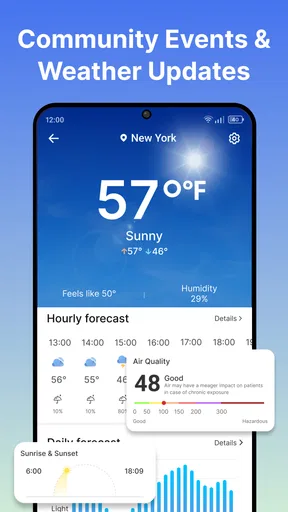
People often ask whether this is better for local updates or international headlines. Its stated focus includes both, so it is appealing if you want those interests under one roof; how useful the balance feels will depend on the stories available to you and what you choose to follow. If you mainly need one neighborhood noticeboard, a dedicated local source may be more direct. If you want a broad scan that can include city and world topics, this is the more natural fit.
Another practical question is whether it works for a household with different reading preferences. It can be used as a shared starting point, but I would not assume that a common device automatically means separate personal feeds or private reading spaces. If privacy between users is important, or several people need independent settings, separate devices or individual accounts in services designed for that arrangement may be a better choice. For casual passing-the-phone use, agreeing on who changes topics and notifications is likely enough.
Offline reading also has a clear use case: prepare articles while connected, then return to them where signal is weak or unavailable. I would download only what I genuinely plan to read, rather than treating the app as a complete offline archive. Similarly, multimedia is a welcome option when I have time to watch or listen, but written articles remain easier to skim quietly in a waiting room or shared space. Choosing the format to match the moment is more practical than trying to consume everything.
Who will appreciate it—and who may not
I would recommend it to readers who want a single place to browse several kinds of news, like adjusting their topic mix, and appreciate the choice of articles alongside video and podcasts. It may also suit someone who wants a straightforward household news screen, provided everyone understands that the feed and alerts are shared decisions on a shared device. The app’s Everyone rating is a useful age marker, but adults should still guide younger readers through sensitive coverage.
I would skip it if I wanted a quiet reading experience with no breaking-news interruptions, a deeply specialized source, or separate household profiles as a central requirement. I would also look elsewhere if I prefer to get news only from a named publication or want a curated daily digest rather than a broader stream. Those are not flaws so much as different needs: the app’s appeal is in gathering varied news in one place, not in replacing every kind of journalism or personal reading setup.
Wrapping It Up
At the end of the day, Global News-Headlines & Alerts is a solid choice for anyone looking to stay informed about world events without wading through an overload of information. Its user-friendly design, customization options, and multimedia integration make it a top contender in the news app arena.
If you’re on the hunt for an app that keeps you connected to world events with ease, give this one a whirl. It might just become your new favorite companion in the quest for knowledge. Happy reading!
My household verdict
For a shared device, I would use it as a common window onto the day’s news, not as a substitute for everyone’s individual reading preferences. Set topic choices with the regular users in mind, keep notifications considerate, and make room for a second source when a story is important. Those boundaries preserve the convenience without pretending that one feed can serve every age, interest, and level of privacy equally well.
Overall, I find the app most worthwhile for people who want a flexible, everyday overview and are comfortable deciding for themselves how much news to let in. Its broad subject mix and different content formats give it practical range, while the need to manage alerts and verify important stories calls for a little judgment. If that balance sounds right for your home or personal routine, it is an easy one to consider; if you need a specialized publication or separate household experiences, another option will fit better.
Pros
- Comprehensive global news coverage.
- Real-time alerts for breaking news.
- User-friendly interface
- easy navigation.
- Customizable news categories.
- Offline reading mode available.
Cons
- Frequent ads can be distracting.
- Limited personalization options.
- Some features require premium access.
- Occasional slow loading times.
- Notifications can be overwhelming.
FAQs for Global News-Headlines & Alerts
What features does Global News-Headlines & Alerts offer?
Global News-Headlines & Alerts provides users with up-to-the-minute news from around the world. Key features include personalized news feeds, breaking news alerts, and the ability to follow specific topics or regions. The app also offers offline reading capabilities and a clean, user-friendly interface that makes navigating content effortless.
Is Global News-Headlines & Alerts free to use?
Yes, Global News-Headlines & Alerts is free to download and use. However, it offers in-app purchases and subscription options for users who want an ad-free experience or access to premium content. These options provide additional features such as exclusive articles and advanced customization settings.
How customizable is the app's news feed?
The app allows significant customization of your news feed. Users can select their preferred topics, sources, and regions to ensure they receive content that aligns with their interests. The app's algorithm learns from your reading habits to refine and personalize the feed further, providing a tailored news experience.
Does the app support offline reading?
Yes, Global News-Headlines & Alerts supports offline reading. Users can save articles to read later when they don’t have an internet connection. This feature is particularly useful for those who want to stay informed while traveling or in areas with limited connectivity.
How frequently are news updates provided?
The app provides real-time updates, ensuring users receive the latest news as it happens. With constant monitoring of global events, breaking news alerts are pushed to your device immediately. This makes it an excellent tool for staying informed about significant developments worldwide, anytime and anywhere.


